
Email series
Set it up once and the emails go out on their own: in order, at the intervals you set. Anyone who did not open an email gets a resend with a new subject.
How a subscriber enters a series
A series starts when an address joins its group. There are four ways, and with any of them the subscriber gets the first email within a minute.
Signup through a form on your site, including confirmation by a link in an email. Subscribed means the first email of the series arrives.
Upload a file to a group in your account or through the import API. Every new address enters the series, while those already in the group before it launched do not get the series emails.
Add an address manually in your account, move or copy it from another group, or build a group with "Create a group". The series itself has an "Add subscribers" button for this.
Your site, CRM or app adds an address to a group with a request to the subscribers API, and the series then runs on its own.
Anyone already in the group before the series launched does not enter it. Neither do blocked and unsubscribed addresses.
How an email series is built
In your account a series is built step by step: who enters it, which emails go out and after how long, who gets each email. Then you launch it. Drag and drop to reorder the emails.
-
01
Entering the series
An address lands in the group, and a minute later it is in the series. How it got there does not matter: site form, API, import or manually.
-
02
Emails and intervals
Each email from your templates goes out a set number of minutes, hours or days after the previous one. Timing: right away or at a chosen hour in your account's time zone.
-
03
Who gets it
An email goes to everyone, or only to those who opened the previous one, did not open it, or clicked a link. The rest skip that email and continue through the series.
-
04
Launch and edits on the go
Edits to a running series collect in a draft. The "Apply changes" button turns them on for all subscribers or only for new ones.
Who gets each email and when
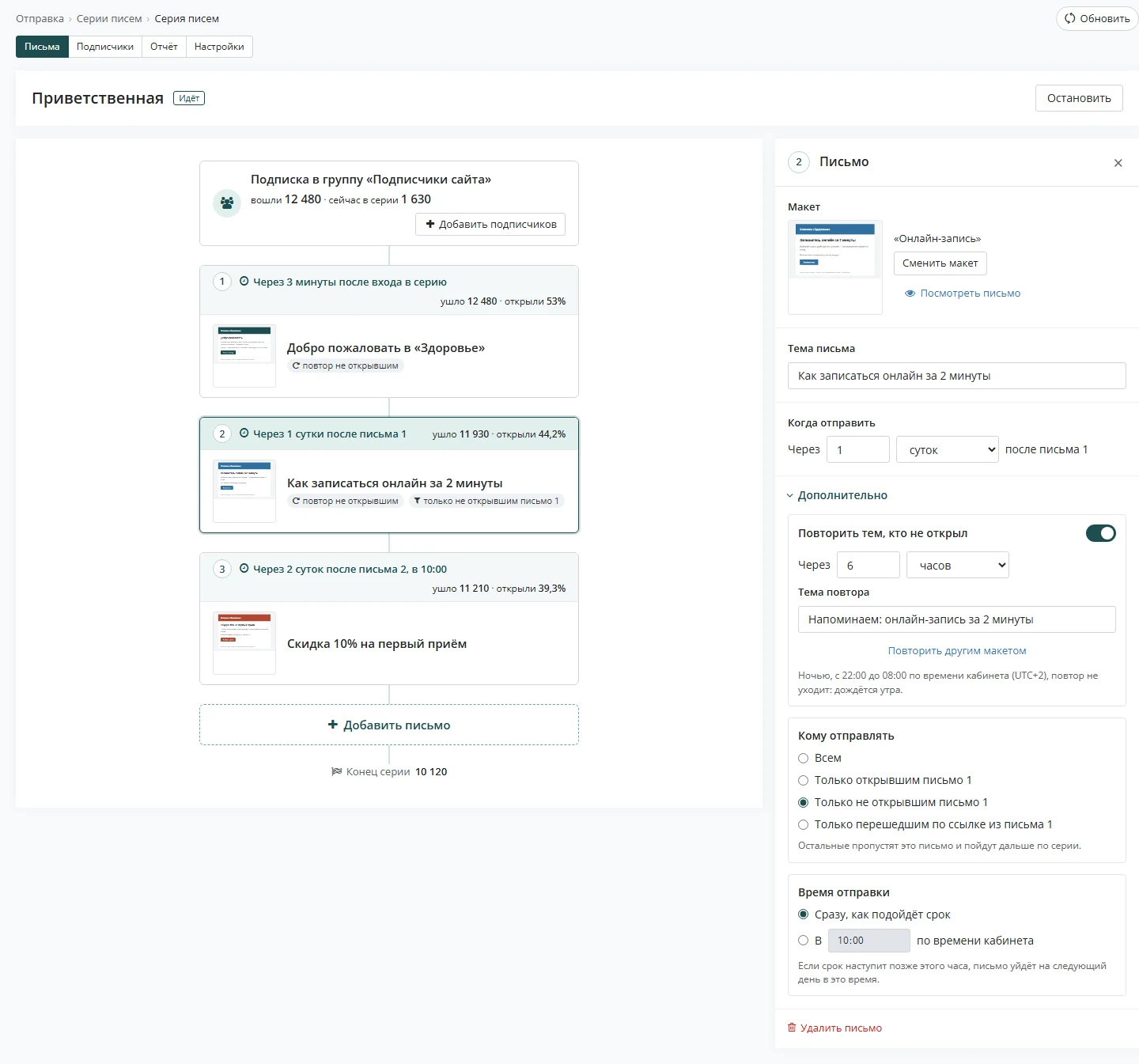
For each email you decide separately when it goes out and who receives it.
When the email goes out
- after a set number of minutes, hours or days after the previous email; the first email after entering the series, or right away;
- as soon as it is due, or at a set hour in your account's time zone, for example 10:00;
- if the due time falls after that hour, the email goes out the next day at 10:00;
- drag and drop on the diagram to reorder the emails.
Each email has its own recipients
- everyone who reached this email
- only those who opened the previous email
- only those who did not open the previous email
- only those who clicked a link in the previous email
The rest skip the email and continue through the series.
Resend to those who did not open
A resend is switched on for an email with one toggle: you do not have to build it from conditions and delays. A subscriber who did not open the email gets it again with a new subject, or a different email.
- Whena set time after the email: from 1 hour to 7 days
- Whatthe same email with a new subject, or another template with its own subject
- At nightfrom 22:00 to 08:00 in your account's time zone a resend waits for morning
- Whoonly those who received the email and did not open it; those who clicked a link or unsubscribed do not get a resend
- Seriesa resend does not delay the next email: the interval is counted from the first email
emailresendopenednight, 22:00–08:00
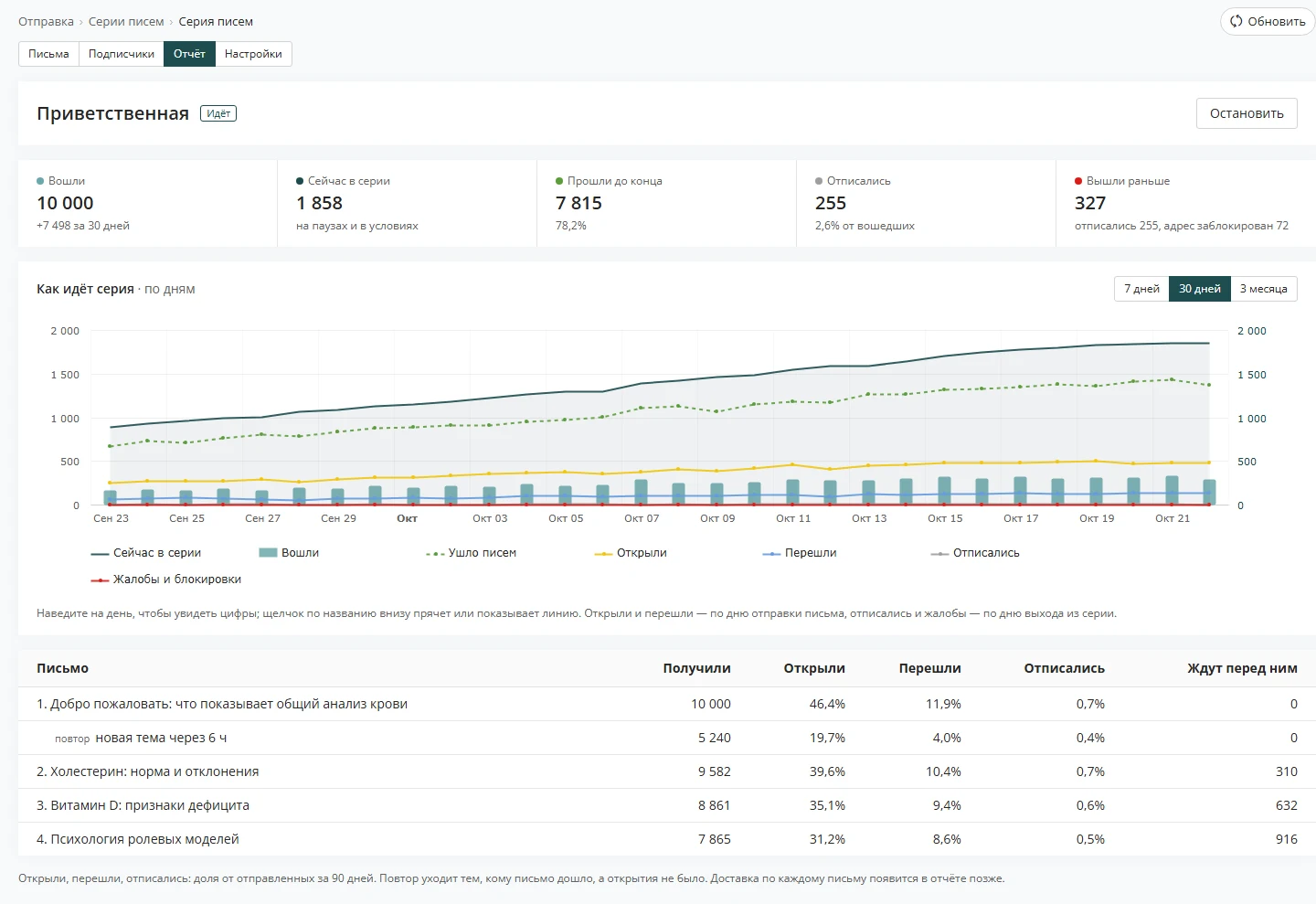
In the series report a resend shows as a separate line under the email: how many received it and how many opened.
Series you can build
Five examples laid out by day. Each is built from ordinary series settings: entry group, intervals, send time, resend and "Who gets it".
Welcome
Introduces you in the first week, while the person still remembers why they subscribed.
Entry: signup through a website form- 1day 0 · right awayWelcomeresend to non-openers
- 2day 1 · after 1 dayWho we are and how we help
- 3day 3 · after 2 daysAnswers to common questions
- 4day 6 · after 3 days, at 10:00A gift for your first orderonly for those who opened email 3
Course by day
One lesson a day at the same time. The student knows when to expect the next one.
Entry: course enrollment, group "Course"- 1day 0 · right awayLesson 1
- 2day 1 · after 1 day, at 10:00Lesson 2resend to non-openers
- 3day 2 · after 1 day, at 10:00Lesson 3resend to non-openers
- 4day 3 · after 1 day, at 10:00Lesson 4resend to non-openers
- 5day 4 · after 1 day, at 10:00Summary and what comes nextonly for those who clicked a link in email 4
After a webinar
The recording, materials and an offer for those who found the webinar interesting.
Entry: attendees added to a group by import- 1day 0 · after 1 hourWebinar recordingresend to non-openers
- 2day 1 · after 1 dayMaterials and slides
- 3day 3 · after 2 daysOffer for attendeesonly for those who opened email 2
- 4day 5 · after 2 daysThe offer ends soononly for those who did not open email 3
Offer with a reminder
A new collection, a selection for those who showed interest, and a discount for those who already clicked.
Entry: group "Customers" from your account- 1day 0 · at 10:00New collectionresend to non-openers
- 2day 2 · after 2 daysA selection for youonly for those who opened email 1
- 3day 4 · after 2 days, at 10:00Discount until Fridayonly for those who clicked a link in email 2
Win back inactive subscribers
Reminds those who have not opened emails in a while. And at the end it asks outright whether they want to stay on the list.
Entry: "Create a group": not opened for a long time- 1day 0 · right awayLong time no seeresend to non-openers
- 2day 3 · after 3 daysWhat is new since thenonly for those who opened email 1
- 3day 7 · after 4 daysStay on the list?only for those who did not open email 1
When you create a series in your account there are two starters: "One email" and "Example with three emails". Ideas for what to write in a series are collected in the blog: articles on automation and series.
What the series report shows
You see the whole series and each email. And if you need to, you can follow a single subscriber's path.
-
Series totals
How many addresses entered, how many are in the series now, how many finished, unsubscribed or left early. Below is a daily chart: entries, emails, opens, clicks, unsubscribes and complaints.
-
Each email and resend
How many received, opened, clicked and unsubscribed, and how many subscribers are waiting before the email. A resend gets its own line.
-
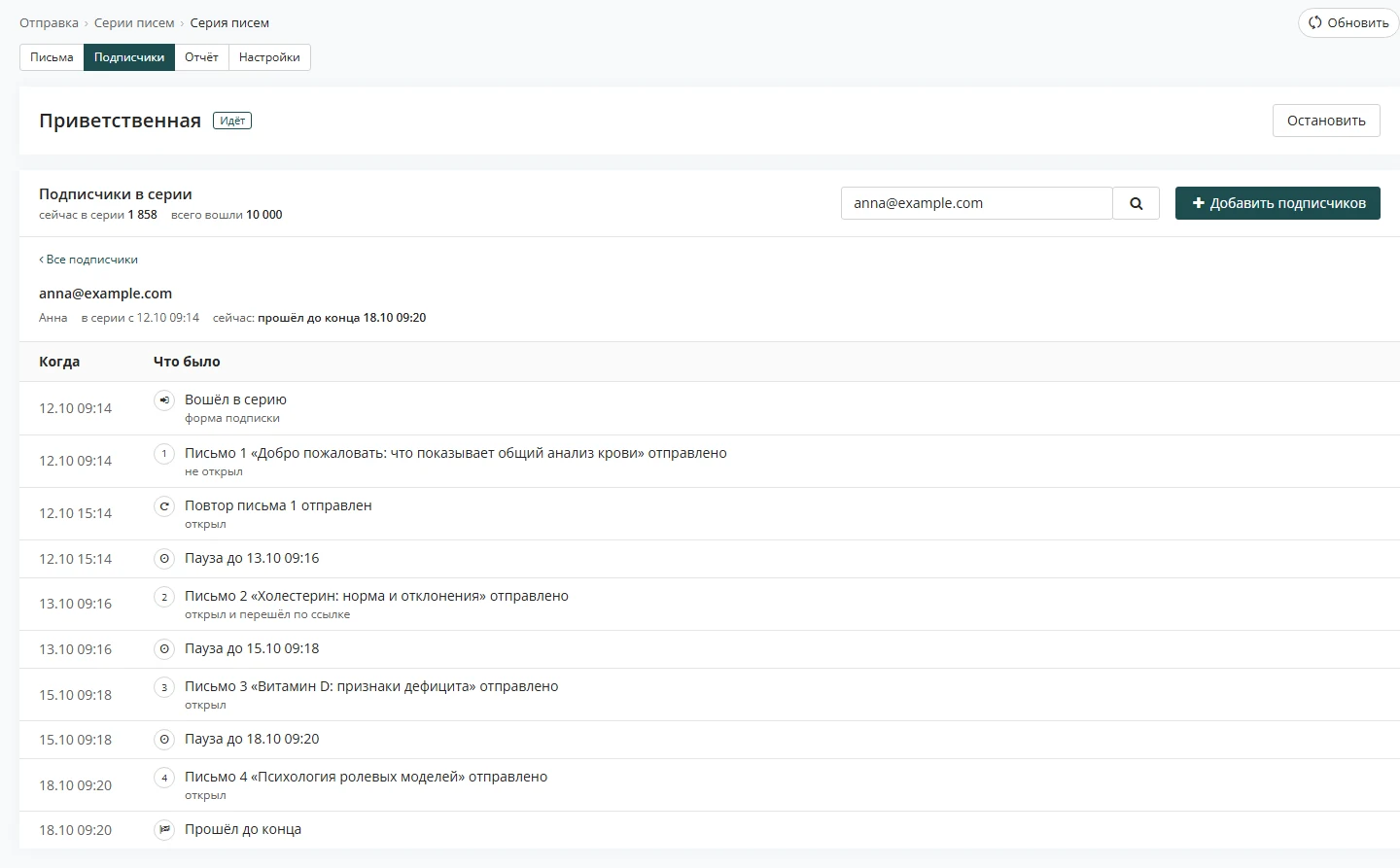
Subscriber path
On the "Subscribers" tab, find an address and you will see when it entered the series, which emails and resends went out, what it opened and when the next one arrives. You can remove the address from the series.
Series and campaigns do not get in each other's way
A subscriber in a series will not get extras, and a series does not interfere with regular campaigns.
Campaign skips the series
The bulk campaign wizard has a checkbox "Do not send to those currently in a series": the subscriber gets the series emails, but not the campaign.
Unsubscribed means out
A deleted address leaves all series within a minute. An unsubscribed person will not get the next series email.
Quiet at night
Resends wait for morning, while emails with a set send time go out at the chosen hour in your account's time zone.
Updated October 23, 2026 · Estismail team
