
Domain rating
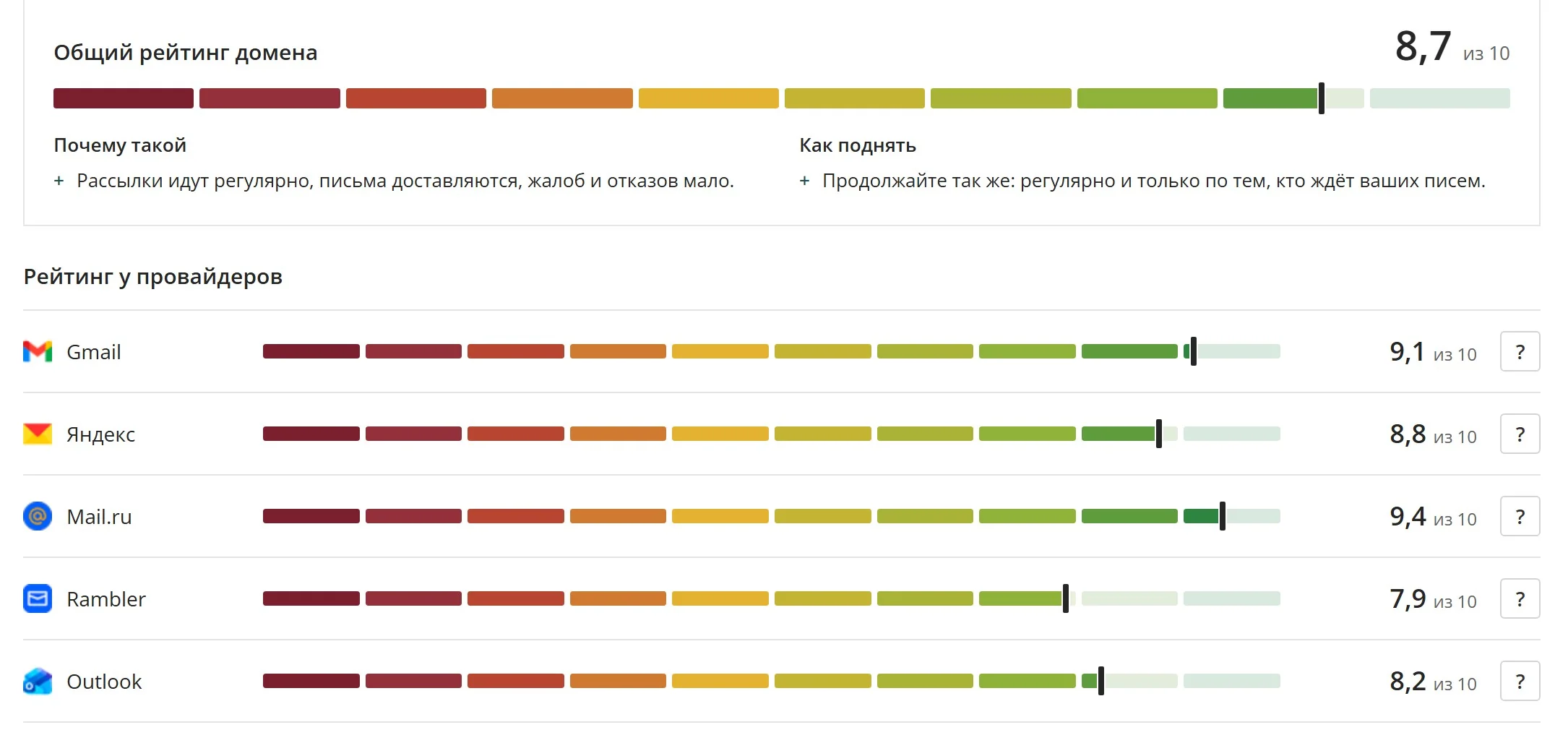
The Estismail domain rating shows, on a scale from 0 to 10, how much Gmail, Mail.ru, Yandex and other providers trust your domain. It is our own score and is recalculated every night. The higher it is, the sooner a campaign reaches full speed. To keep the rating from dropping, Estismail systems monitor your sending.
 Gmail9.1 out of 10
 Mail.ru9.4 out of 10
 Yandex8.6 out of 10
Sample data. This is how the rating looks in your account.
A lot depends on the rating
Every campaign starts with a small test batch, then ramps up. With a high score, emails reach full speed quickly. With a low one, the start is gentle and the ramp slow, so the provider does not get suspicious.
- High score
- Medium score
- Low score
What raises and what lowers the rating
The rating is based on campaigns from the last 30 days, with recent ones weighing more. Every night the score for each provider is recalculated.
Raises it
- email opens
- clean campaigns without bounces and complaints
- Mail.ru Postmaster connected
Lowers it
- spam complaints
- "spam" replies from the provider and blocks
- nonexistent addresses
- rare opens
- a young domain
- for Mail.ru: a domain without Postmaster
How to raise it: sign your domain (what is DKIM), connect the domain to Mail.ru Postmaster, remove nonexistent addresses (provider server replies), send regularly and warm up a new domain. Why emails land in Spam.
Where to see your rating
In your Estismail account, in the domains section: a score from 0 to 10 for each provider and a hint explaining it. It is our score, based on provider server replies, complaints, opens and Postmaster data, not an official Gmail or Mail.ru score.
How Estismail keeps the rating from dropping
The rating drops because of complaints and bounces. So Estismail systems watch every campaign and step in before your domain suffers.
-
A test batch first
First a small batch of emails goes to each provider, and only then does the campaign pick up speed.
-
Its own pace for each provider
Gmail, Mail.ru, Yandex and other providers have different rules, so each gets its own pace: some can take it faster, others need a gentler approach.
-
Pause on rejections
If a provider starts rejecting emails, sending to it slows down or pauses, while the others carry on.
-
Auto-stop with a notice
If a provider treats emails as spam, sending to it stops. If your list has many nonexistent addresses, the whole campaign stops. You get a message with the reason and a link to the report.
-
Complaints switch addresses off at once
Mail.ru FBL is connected: an address that complained is removed from mailings right away.
-
Watchdogs and alerts
Watchdogs check sending around the clock and alert our team right away if something fails.
-
Manual review of clients
We check every new client before their first campaign, so other senders cannot damage your reputation.
-
The same on every plan
Protection does not depend on the plan: the same systems work on Free and on Enterprise.
Rating, provider dashboards and Sender Score
Three different things. Here is how they differ.
| Estismail rating | Provider dashboards | Sender Score | |
|---|---|---|---|
| What it measures | your domain at each provider, from 0 to 10 | your domain or IP as one provider sees it: delivery, complaints, reputation | the sending IP address, a third-party score from 0 to 100 |
| Mailbox providers | Gmail, Mail.ru, Yandex, Outlook and others separately | each has its own, and not all do: Mail.ru Postmaster, Gmail Postmaster Tools, Yandex Mail Office, Outlook SNDS, Yahoo Sender Hub | one overall score with no breakdown |
| Affects sending | yes: it sets the campaign pace right away | no, it is statistics: check each one separately | no, it is a reference |
Prepared by the Estismail team, updated October 22, 2026. Plans and what they include are on the pricing page.
