Mail.ru Postmaster
Mail.ru Postmaster is a free Mail.ru dashboard for bulk senders. For your domain it shows how many emails reached the inbox, how many went to spam, how many complaints there were and how reputation changes. Statistics follow the domain in the DKIM signature, so your emails must be signed with your domain.
d=shop-example.com.How to connect a domain to Mail.ru Postmaster
Log in at postmaster.mail.ru with a Mail.ru mailbox, click "Add domain" and enter the domain from the DKIM signature of your emails. Then confirm that you own the domain in one of three ways. You can add as many domains as you like.
HTML file: use it if you have a website on this domain
- Download the file with your code on the "HTML file" tab.
- Put it in the site root: the file must open at the domain address without redirects.
- Click "Confirm".
Meta tag: use it if you have a website and access to the home page code
- Copy the meta tag with your code from the "Meta tag" tab.
- Paste it into the home page code, before the closing </head> tag.
- Click "Confirm".
DNS record: use it if you have no website or it is on another server
- Open the "DNS check" tab and copy the record.
- Add it to the domain's DNS at your registrar or hosting provider. DNS updates take time.
- Click "Confirm". If you are not sure, ask your system administrator.
Statistics appear once the first emails signed with this domain go out. SPF and DMARC data refreshes weekly; DKIM data updates as soon as a signed email arrives.
Per Mail.ru Help: adding a domain (updated September 8, 2025).
Why Postmaster is empty
Postmaster records domain statistics from the active DKIM signature and ignores the From address. Answer three questions to find the cause.
-
Do your emails carry a DKIM signature?
Without a signature there will be no statistics. In Estismail every email is DKIM-signed: check that your domain records are set up in the account, in the domains section. -
Does the signature use your domain, not only the sending service's domain?
This is the most common cause: the emails carry only the sending service's signature, so statistics go to its domain. Connect your domain's key in your Estismail account: the email is then signed with your domain and ours, and Postmaster shows your statistics. -
Does the signature pass verification?
If the private key does not match the public key in DNS, the signature fails and there are no statistics. Check the DKIM status in your Estismail account: it shows whether the record matches. -
Everything is correct, but still no statistics?
Check that Postmaster has the exact domain from the signature (the d= tag) and that emails with this signature have already gone to Mail.ru addresses. Still stuck? Write to us: support@estismail.com.
The three causes of empty statistics are described in Mail.ru Help, "Domain statistics" (September 8, 2025). What is DKIM.
How to read Postmaster
A real Postmaster snapshot for Estismail sending domains, October 20, 2026, domain names hidden. Click a label to see what the column means.
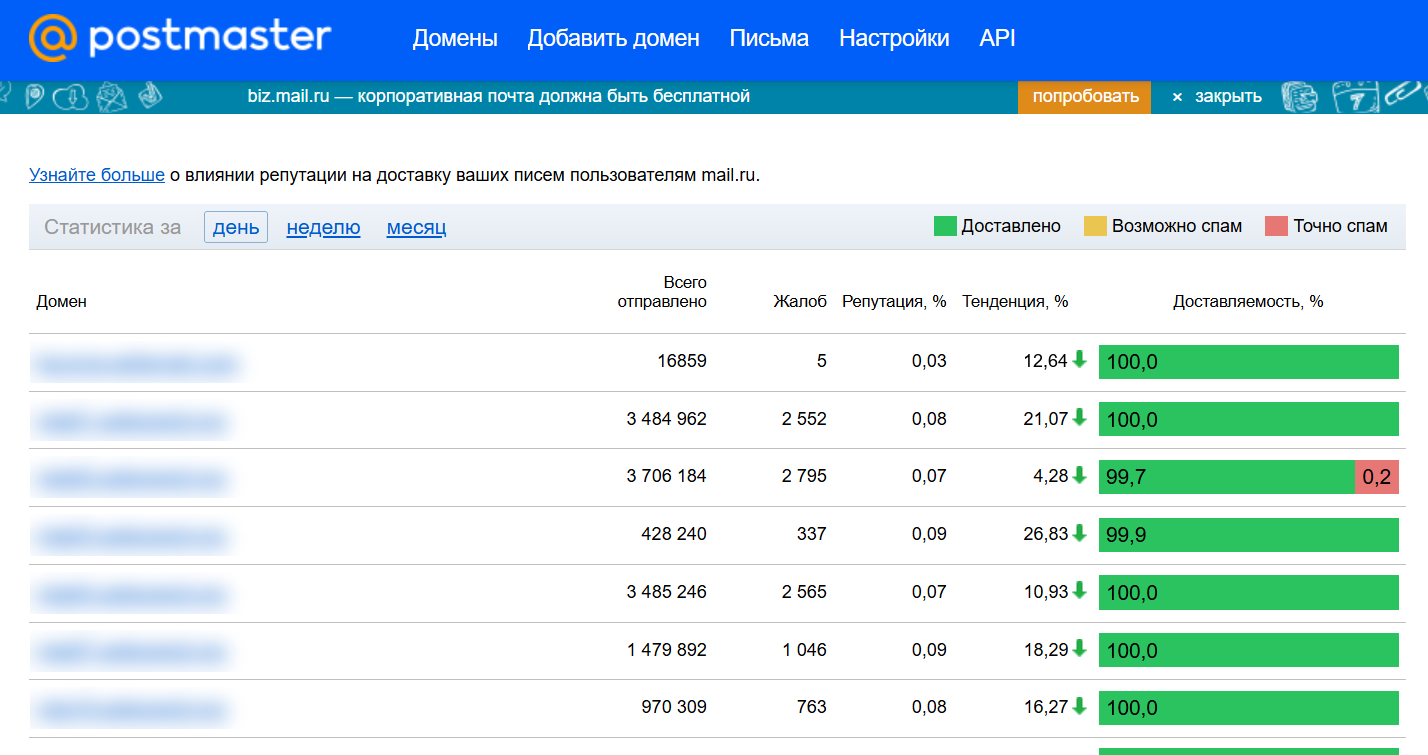
- 1Domain
- The domain from the DKIM signature (the d= tag). Not the one in From: Postmaster counts only by signature.
- 2Statistics for
- The period: day, week or month. Click the label to see another period.
- 3Total sent
- How many emails from this domain reached Mail.ru servers during the period.
- 4Complaints
- How many emails recipients marked with the "Spam" button.
- 5Reputation
- Average complaint rate over the last 30 days. Lower is better. The acceptable threshold depends on volume: from 1.1% to 0.3%.
- 6Trend
- How the complaint rate changed over 7 days compared with 30 days. A green arrow down means fewer complaints.
- 7Deliverability
- Shares of emails: green means "Inbox", yellow "Possibly spam" (usually the Spam folder), red "Definitely spam": emails not accepted.
- +Read and deleted
- On the full domain page: how many emails were opened (one email can be opened several times), and how many were deleted read and unread.
Complaints or "Possibly spam" rising? Where to look for the cause: why emails land in Mail.ru Spam.
The columns are described per Mail.ru Help. Complaint thresholds by volume are in the Mail.ru complaint threshold calculator. "Definitely spam" arrives as the reply 550 spam message rejected: Mail.ru server replies.
The "Problems" tab
Here Postmaster shows, for the last day, what hinders delivery and what can hurt the domain's reputation.
-
User not found
Emails to nonexistent addresses: the reply is "User not found".
Remove such addresses from your list.
-
Complaints
How many emails recipients marked as spam.
Check who you sent to that day, and what.
-
No SPF or DKIM
The emails have no SPF record or DKIM signature.
Set up your domain records in your Estismail account.
-
No DMARC or a weak policy
There is no DMARC record, or it forbids nothing.
Add DMARC with a quarantine or reject policy.
How Estismail works with Postmaster
Our sending domains are connected to Mail.ru Postmaster: over 10 million emails a day to the inbox with 0.08% complaints. Details on the page Mail.ru requirements for bulk email.
- Your domain in the signature. Once your domain key is connected in your account, the email is signed with your domain and ours: Postmaster shows your statistics.
- Mail.ru FBL is connected. You do not need to set it up: an address that complained is removed from mailings right away.
- Domain rating accounts for Postmaster. The domain rating for Mail.ru in your account takes into account whether the domain is connected to Postmaster.
- We'll help you connect it. Write to support and we'll do it together with you: support@estismail.com.
The short version
Does Postmaster give an advantage?
No. Mail.ru says it plainly: using Postmaster gives no advantage in delivery requests. It exists so you can see your reputation and react in time.
Do I need to set up FBL myself?
If you send through Estismail, no: Mail.ru FBL is already connected. Under Mail.ru terms, FBL reports must not be passed to third parties.
Is there an API?
Yes. Access is via OAuth 2.0: a long-lived refresh_token and an access_token valid for one hour. It is for developers who want to pull statistics automatically. API description.
Based on the Postmaster terms of use (version of December 14, 2022) and the API description. Prepared by the Estismail team, updated October 21, 2026.
